ShiftStage

Eleven times it pays for the year

Not «you can check things remotely». Specific situations, each of which otherwise ends with you opening a laptop.

AI sessions

The agent has been waiting forty minutes for one word

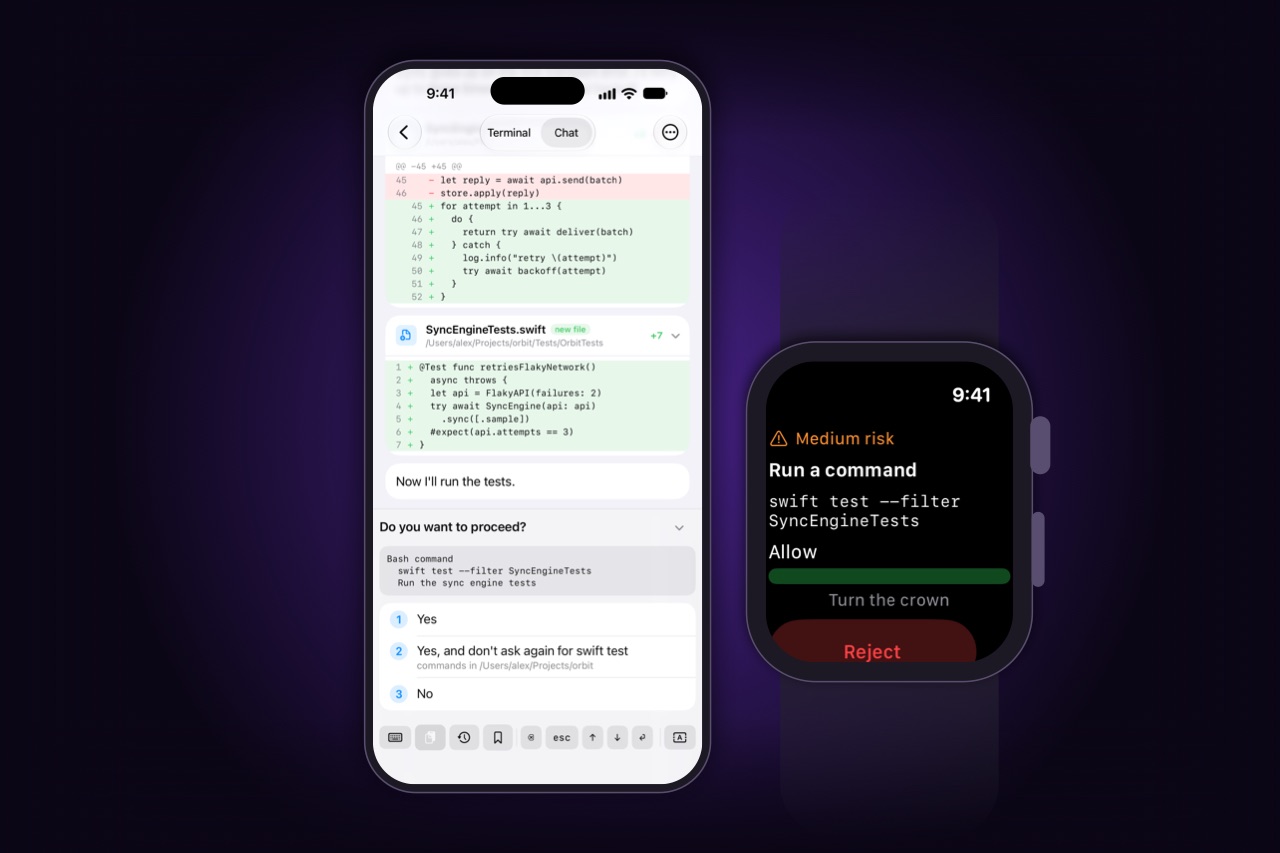
You handed it a refactor and left. Ten minutes in it wanted to touch a file it was not sure about, and asked. Nobody answered — so that is not a pause, that is the rest of the run, cancelled. Here the question reaches your phone the moment it appears, with the command and the risk spelled out, and a tap puts the run back in motion.

An agent's edit and its request to run the tests, on the phone and on the watch

Git · diff

Reading what an agent wrote before it becomes your commit

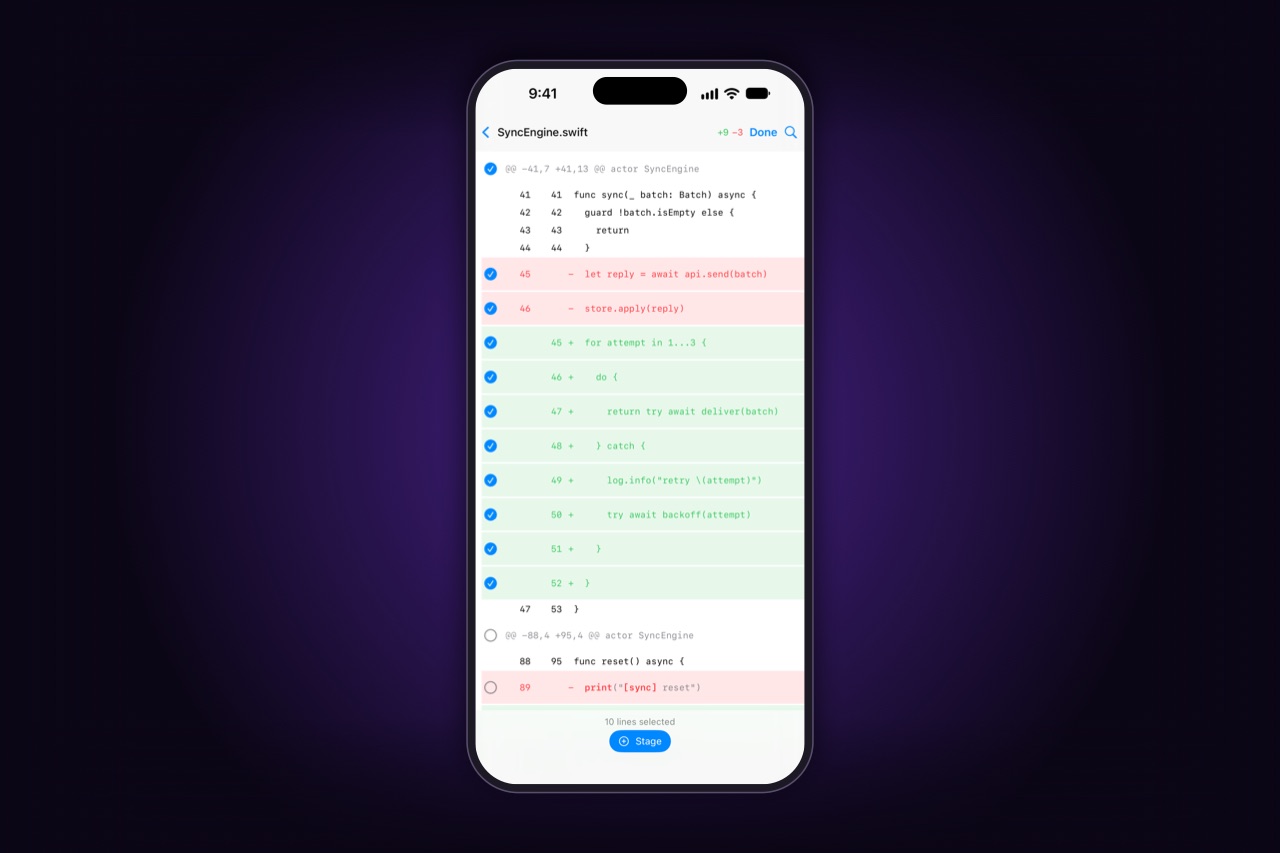
Twelve files touched. Two are exactly what you asked for. One is a rename it threw in for tidiness. One edited a test until the test passed. You read that the way you would at the desk — real diff, syntax colour kept, changed fragments marked inside the line — then stage the three that are right, discard the test edit, and send the rest back with one sentence.

A diff on the phone: removed and added lines, the ones for the commit picked line by line

Files · preview

The report it wrote, read before you decide anything

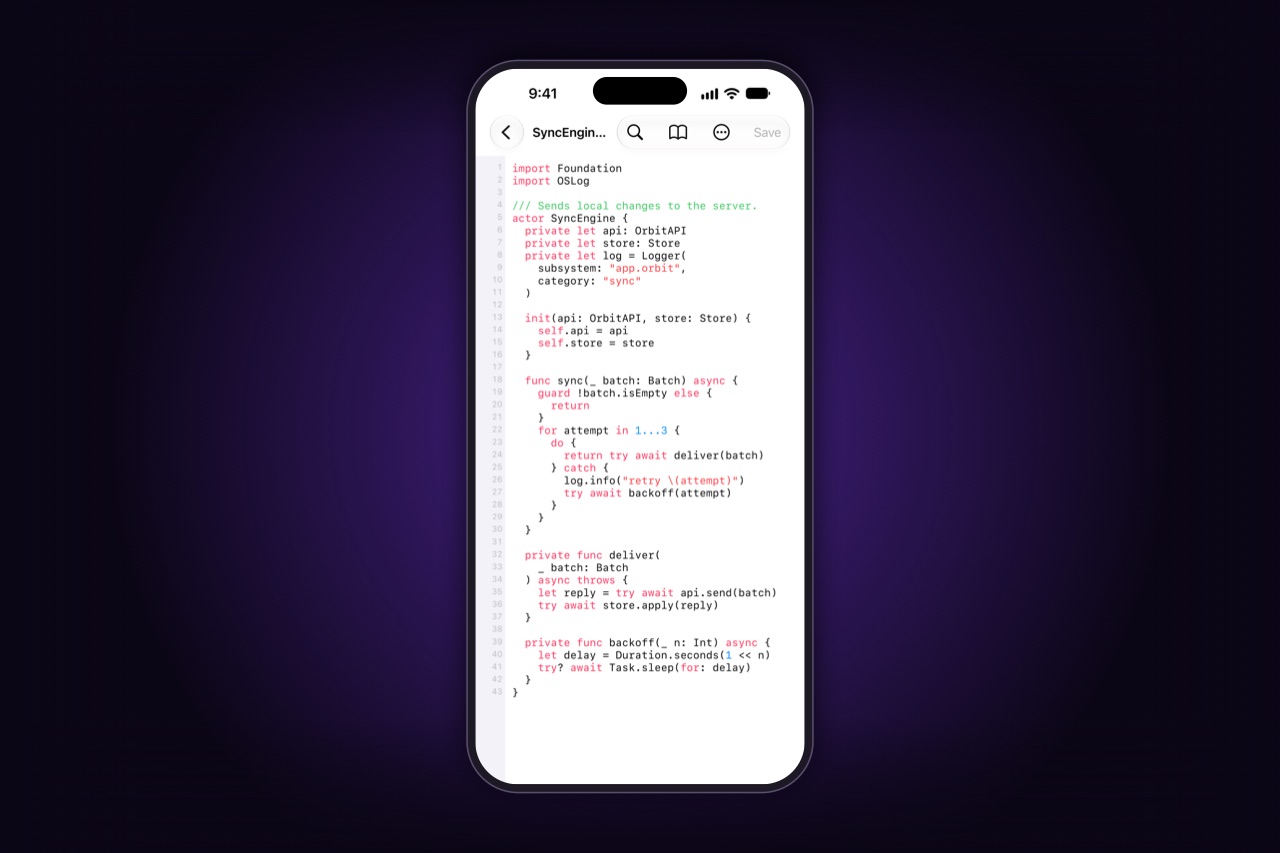
You asked for an analysis written to a file. Reading it should not mean downloading it into a folder you will forget about — it opens rendered, with the raw source one tap away, and nothing is left on the phone unless you say so. Then: keep a copy that opens later with the Mac asleep, or send it straight out of the share sheet to whoever is waiting for it.

A source file from the Mac, opened on the phone with syntax highlighting

Files · transfer

Someone needs a file that exists only on your Mac

Friday's export, a signed build, the document a colleague needs in the next ten minutes. It is in a folder you could point to with your eyes closed, and you are two hours from it.

  • previewLook before you fetch: text, markdown, images, PDF — streamed, not pulled down whole
  • keepA copy on the device only by your command, and it says when it was saved
  • shareOut through the system share sheet: any messenger, mail client or upload form
  • both waysA photo from the gallery or a shot taken right there lands in the project folder

Git · history

«What landed here last week» is the only useful question

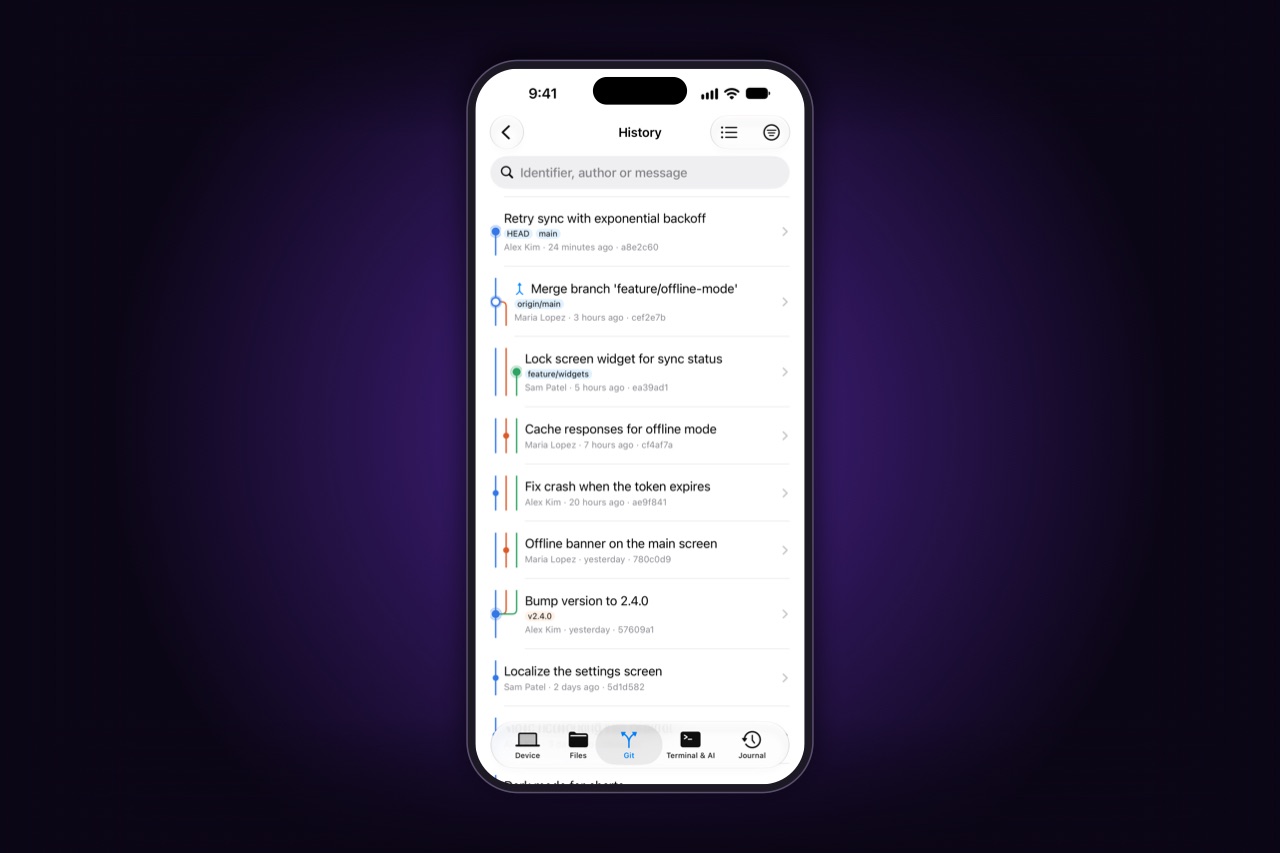
Something behaves differently and nobody remembers touching it. You do not need the whole repository on a phone — you need the last twenty commits on that branch, who wrote them, and the diff of the two that look guilty. Filter by author, by file, by message; open the commit; read it.

Commit history as a graph of branches, with tags, authors, relative dates and short hashes

CI · notifications

The build broke after you pushed and closed the lid

Forty minutes later the phone says it failed — and says what it failed on, not just that it did. Before, that was a problem for tomorrow, or a laptop opened on a restaurant table.

  • notificationNames the build and the step, not just «something failed»
  • logFolded into steps with their durations; from a failed step straight to its place in the output
  • terminalA real PTY on the Mac: reproduce it, read the scrollback, search it
  • rerunFix the typo, commit, run it again — from the same screen

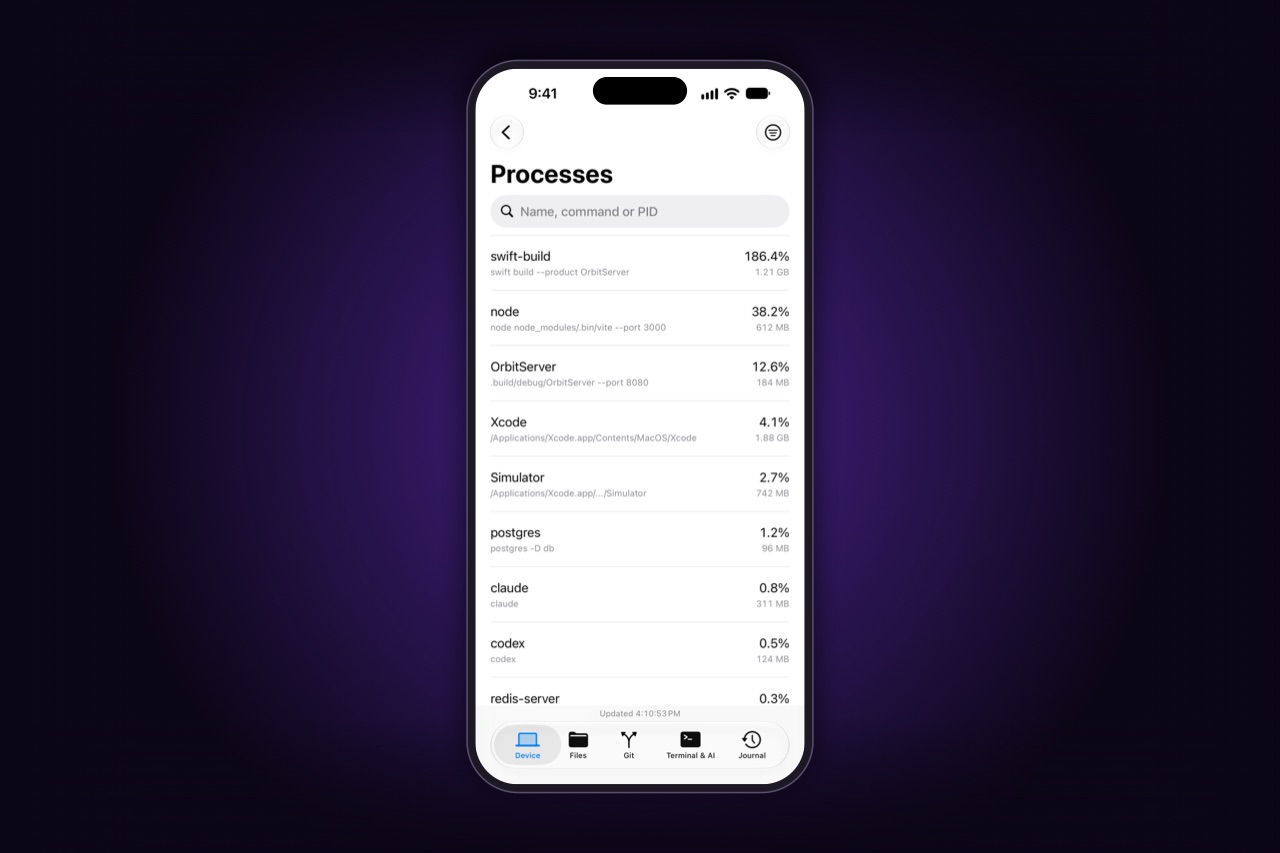
Processes

Something is holding the port and it is not going to stop by itself

A dev server that survived the tab you closed. A test run that will not end. A process that has been eating a core since lunch and is heating a machine nobody is sitting at.

Processes on the Mac by load: a build, a dev server on port 3000, a database

CI/CD

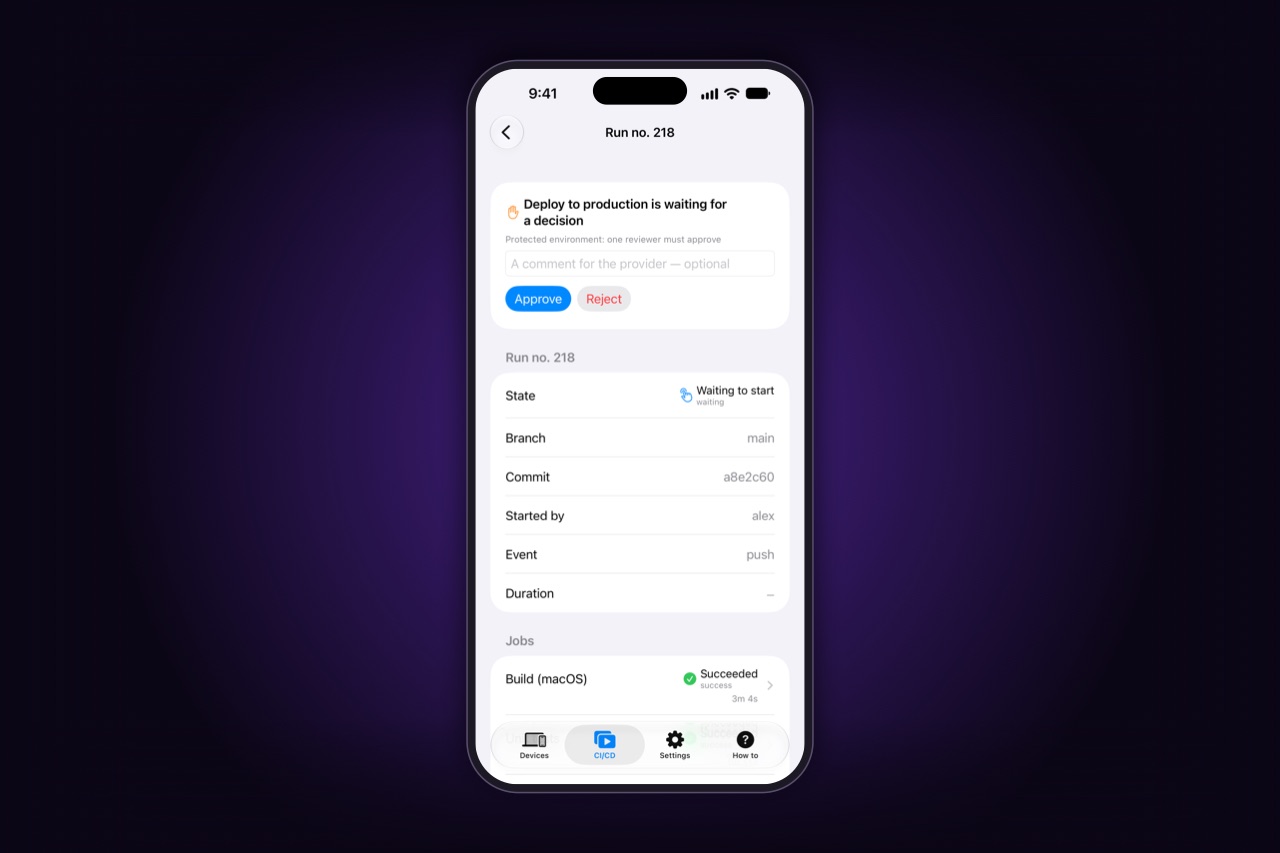
A pipeline to start, and no Mac in sight

This is the one part of ShiftStage that needs no Mac at all: the phone talks to the provider directly. A release to cut from a moving train, a nightly to kick off again, a deploy stage waiting for somebody to approve it.

A run waiting for a deploy to production to be approved, with Approve and Reject on the phone
  • providersGitHub Actions · GitLab CI/CD · Jenkins · TeamCity
  • self-hostedYour own installations, not only the clouds; several accounts at once, each marked with its system
  • parametersThe names, types and defaults the pipeline declares; a required one will not start empty
  • approvalsA run waiting on a human is released from the phone, where the provider allows it

CI · logs

A build log you can actually read on a phone

Build logs are the worst thing to read on a small screen, and every other tool hands you a web page to pinch-zoom.

▾ Build and test                      2m 14s
    ✓ Compile 128 targets
    ✓ Run 1 412 tests
▾ Package                             41s
    ✗ notarytool: invalid credentials
      → jump to this line in the log
▸ Upload artifacts                    skipped
  • colourWhat the build printed in colour stays coloured
  • progressRedrawing progress bars show their last state, not a thousand stale lines
  • sectionsGroups fold, each with the time it took
  • artifactsWhat the run produced, with sizes, saved to the device

Connection

You left the house, and the connection followed

At home the phone and the Mac talk directly over the local network, with no server of ours in the path at all. Walk out, and they still connect directly whenever the networks allow it; when the networks refuse, a relay forwards a stream it cannot read. You can see which path you are on, and you can forbid the third one.

Access log

What was done on your Mac, and by which device

Remote access without a record is trust by assertion. The agent keeps a log on the Mac: every operation a connected device asked for, when, which device, and how it ended — with the subject named by the request itself.

  • recordedEvery operation: when, which device, how it ended
  • subjectThe path, the branch, the process, the search string, the bytes transferred
  • neverNo file contents, no output, no input, no AI conversation
  • yoursThe log never leaves the Mac, and you can switch it off

From here it is your Mac

Everything above is what we thought of. The list does not end there, because the terminal is a real one — a PTY on your machine, not a sandbox of ours.

Your scripts, your aliases, your build tools, your automations, the dotfiles you have been carrying between machines for a decade. If it works on your Mac, it works from your phone — and none of it passes through us on the way.

All of it, in one list

Terminal
Real PTY, several sessions, scrollback with search, selection and paste, colour and formatting intact. What you type appears without waiting for the echo. Hidden input for sudo, released by Face ID.
Files
Browse, preview, read, edit, transfer both ways, Files app integration. Photos and video from the phone into a project folder; saved copies that open with the Mac asleep.
Search
By name and by contents, across every workspace at once, streamed as matches are found — each with path, line and context. Regex, case, extension filters. A new query cancels the previous one on the Mac.
Git
Status, diff, stage, commit, push, branches, history and its graph, stash, rebase, cherry-pick, three-way conflict resolution, submodules, LFS — as structure, not scraped text.
Processes
What is running, what it costs, which ports it holds, what it prints, and how to stop it.
AI sessions
Eleven agentic CLIs found automatically and any other one you have: start, watch, answer, approve, archive, resume. Your keys, your config, no model on our side.
CI/CD
GitHub Actions, GitLab CI/CD, Jenkins, TeamCity, including self-hosted. Several accounts at once, declared parameters, cancel, rerun, rerun failed only, approvals, artifacts, steps, readable logs. Needs no Mac.
Notifications
Builds, sessions asking a question, managed processes that died — named by subject, and sent only when you are not already looking.
Apple Watch
Answer a tool's question, see what is running, release the Mac. Its own key, a direct connection, opened for the action and closed after.
Access log
On the Mac, owned by the Mac: every operation with its subject, never any content. Filterable, exportable, and switchable off.

It does not mirror your desktop, does not move your work to a server, and does not put a model between you and your code. The Mac stays the machine that does the work.

The questions people ask next · How to get it

Eleven situations.
Seven dollars a month.

Free for one Mac on your own network.